Creating Relationships to an Element
You can create relationships from an element to a new or existing element in the diagram.
Creating Relationships Options
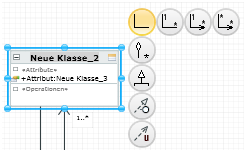
Relationships are normally created between model elements in a diagram using the so-called carousel.
It is also possible to edit dependencies between model elements in the Dependencies tool window or in the Dependency Editor.
Standard Case: Carousel
The carousel appears next to the selection rectangle of the diagram element selected; it shows circular icons for the relationships that are permissible for the diagram element selected. Click and hold on the relationship icon until the rubber band appears; drag the mouse to where you want the new element or drag it to an existing diagram element which you want the relationship to be created for.
A drop-down list appears for you to choose from when you release the mouse button if more than one element type can be created; otherwise, the permissible element is created.
The mouse pointer  shows you if the selected relationship cannot be made to the existing diagram element.
Example for a relationship selection in a selected class' carousel:
Special Case; Dependencies
A dependency is a relationship between two model elements and represents the fact that when a change is made to the independent model, this will affect the dependent model. The dependency refers to the model elements themselves and not to any instances of these elements which may exist. Dependencies can be specified as a generalization, abstraction, use, realization, satisfy etc. depending on the configuration made.
You can use the Dependencies and Dependency Editor tool windows for editing dependencies.
Creating a Relationship Using the Carousel
Diagram exists, is opened and reserved for editing. Source element exists.
If there is only one possible target, the target element type doesn't need to be selected and the new element is created straight away.
If the target is an element which already exists in the diagram, you need to place the mouse pointer over this element.The mouse pointer shows whether a link can be made to an existing element.
- Select the relationship's source element in the diagram.
- Select the desired relationship in the carousel.
- Drag the relationship to the target position and drop it there.
If there is more than one possible target element type, these then appear in the drop-down list. If there is only one possible target element type, the relationship is created to the only target element or the target element which exists and the next step is irrelevant.
- Select the target element you want from the drop-down list.
The target element is created and linked with the source element.
 Related Topics